

Hey everyone, and welcome back to the blog! Today we are diving into a fantastic intersection of web development and Artificial Intelligence. If you have ever wondered how applications figure out whether a movie review is positive or negative, the secret sauce is Natural Language Processing (NLP).
We are going to build a lightweight, fully functional sentiment analyzer from scratch using Node.js. You do not need a massive machine learning background to get this working. We will use a popular package to handle the heavy lifting, allowing us to focus on the logic and architecture.
Let's get right into it!
Prerequisites
Before we start writing code, make sure you have the following ready to go:
- Node.js installed: Any recent LTS version will work perfectly.
- A code editor: VS Code is highly recommended.
- Basic JavaScript knowledge: Familiarity with variables, functions, and arrays.
If you need a quick refresher on backend basics before proceeding, I highly recommend searching for "Node.js Crash Course" by Traversy Media on YouTube. It is an incredible primer for understanding how Node operates under the hood.
Step 1: Setting Up the Project
First, we need to initialize a fresh Node environment. Open up your terminal, create a new directory for this project, and navigate inside it.
mkdir nlp-sentiment-analyzer
cd nlp-sentiment-analyzer
npm init -y
Next, we are going to install our core dependency. We will use natural, which is a fantastic general-purpose NLP toolkit for Node.js.
npm install naturalStep 2: Writing the Analyzer Logic
Create a new file named index.js in your project folder. We are going to import the library, set up a stemmer, and create our sentiment analysis function. A stemmer simply reduces words to their root form (like turning "running" into "run").
Here is the complete code to get your analyzer working:
// index.js
const natural = require('natural');

// We use the AFINN vocabulary, which assigns scores to words based on sentiment.
const Analyzer = natural.SentimentAnalyzer;
const stemmer = natural.PorterStemmer;
const analyzer = new Analyzer('English', stemmer, 'afinn');

// A helper function to tokenize and analyze text
function analyzeText(text) {
    // Tokenization splits the sentence into an array of individual words
    const tokenizer = new natural.WordTokenizer();
    const tokenizedText = tokenizer.tokenize(text);

    // Calculate the sentiment score
    const score = analyzer.getSentiment(tokenizedText);

    return {
        originalText: text,
        tokens: tokenizedText,
        sentimentScore: score
    };
}

// Let's test it out!
const positiveReview = "I absolutely love writing code and building amazing projects!";
const negativeReview = "My computer crashed and I lost all my data. This is terrible.";

console.log("Positive Test:", analyzeText(positiveReview));
console.log("Negative Test:", analyzeText(negativeReview));
Step 3: Running the Code
Head back to your terminal and execute your file:
node index.js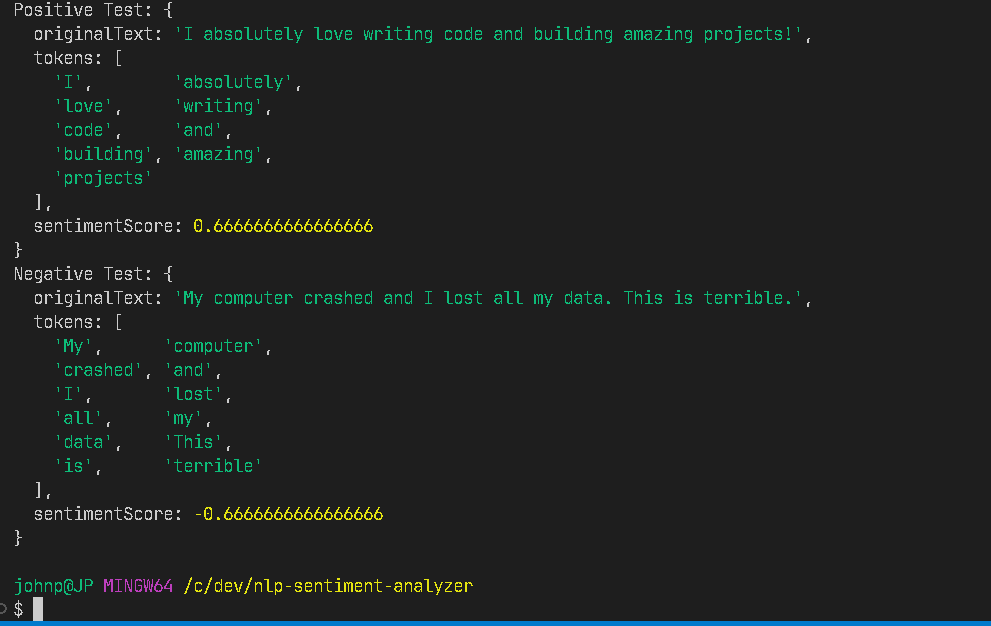
You will see an output showing your tokenized arrays alongside a sentiment score. A positive number indicates a positive sentiment, while a negative number indicates a negative sentiment. The further the number is from zero, the stronger the emotion detected in the text!
Choosing the Right NLP Tool for Your Next Project
The natural package is just one of many options available in the JavaScript ecosystem. Depending on what you are building, you might want to explore other libraries. Here is a quick breakdown to help you decide for your future apps:
| Library Name | Primary Use Case | Learning Curve | Key Feature |
|---|---|---|---|
| Natural | General text processing and algorithms | Medium | Built-in tokenizers and stemmers |
| Compromise | Fast, lightweight text parsing | Easy | Incredible out-of-the-box entity recognition |
| NLP.js | Building chatbots and full pipelines | Steep | Native support for multiple languages |
Wrapping Up
And there you have it! You just built a working NLP tool with just a few lines of JavaScript. You can easily take this logic and wrap it in an Express.js server to create an API, or connect it to a database using SQL to analyze user feedback over time. The possibilities for scaling this up are endless.
Happy coding, and let me know in the comments what kind of text you plan on analyzing next!